100-USR-Registry

User and Machine Registry (USR_REGISTRY) Parameters

Version 6.0 – Version 6.1 (In Development)

User and Machine Registry

The KEY TYPE is used to identify USER and MACHINE registry parameters.
Key Type 1 = User ID registry, – IDENTIFICATION Code = User Id
Key Type 2= Machine registry – IDENTIFICATION Code = Machine Name
Payment Processors not updated

Cash Collection Parameters

Read More...

By User ID

Registry Type Section Name Key Name Key Type Identification CD Key Value Encrypted Action Notes
Cash Collection Cashier Cash Collection Cashier auto collapse MCR Group and AR Class Distribution 1 user id 0 or 1 0
Cash Collection Cashier Cash Collection Cashier search style 1 userid Style lookup 0 Default lookup group in Cash Collection Form VERIFY conditions
Cash Collection Cashier Cash Collection Cashier real estate up to installment 1 userid 1,2,3,4,t 0
Cash Collection Cashier Cash Collection Cashier self reported tax breakdown by periods 1 userid 0 or 1 0
Cash Collection Cashier Cash Collection Cashier show only accounts by balance 1 userid 0 or 1 0 A/R with a zero balance will not be displayed in the grid
Cash Collection Cashier Cash Collection Cashier year to collect 1 userid YEAR, 0 or null 0 If a year is entered, only A/R for this year will be displayed
default collection type Missing (credit card, cash, etc.)
Cash Collection Parameters Cash Collection credit card type 1 userid Table Lookup will need to use the new table CC TYPE
Cash Collection Parameters Govern allow Misc. Cash Receipts 1
Govern allow xxx Data Entry (Fee, Demand, Discount…) 1 Deprecrated
Govern bill validation verify
Govern cashier Id Text verify
Govern check validation
Govern credit card data entry Automatic/Manual Deprecated?
Govern default access type Table Lookup Property Control, Real Property, SRT, Name … Still in use?
Govern default cycle
Govern default payment data entry year
Govern display cycle code Deprecrated
Govern display fiscal year field Deprecrated
Govern display installment field Deprecrated
Govern print credit card receipt to verify
Govern print receipt log see roadmap
Govern receipt group 3 letter
Govern use cash drawer
Govern slip driver, font, etc. To be reviewed
Cash Collection Parameters Payment Data Entry deposit to be reviewed

By Machine

Registry Type Section Name Key Name Key Type Identification CD Key Value Encrypted Action Notes
Cash Collection Cashier Cash Collection Cashier cash drawer name 2 machine name EPSON TM-H6000IV Receipt 0 As shown in Windows Printer names
Cash Collection Cashier open cash drawer sequence 2 machine name 27;105 0
Cash Collection Parameters All the same section names and parameters as by User ID


100-USR-Registry


0 votes, average: 0.00 out of 50 votes, average: 0.00 out of 50 votes, average: 0.00 out of 50 votes, average: 0.00 out of 50 votes, average: 0.00 out of 5 (0 votes, average: 0.00 out of 5)
You need to be a registered member to rate this.
Loading...

Upgrade Information

Upgrade Information

Overview

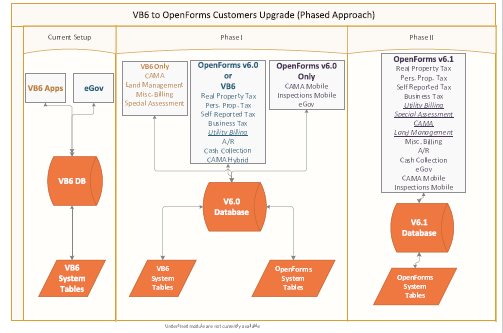
If you want to upgrade Govern for Windows to OpenForms 6.0

100-upgrade-ux-diagram.png

Govern for Windows Upgrade Path – Click to Enlarge

Read More...

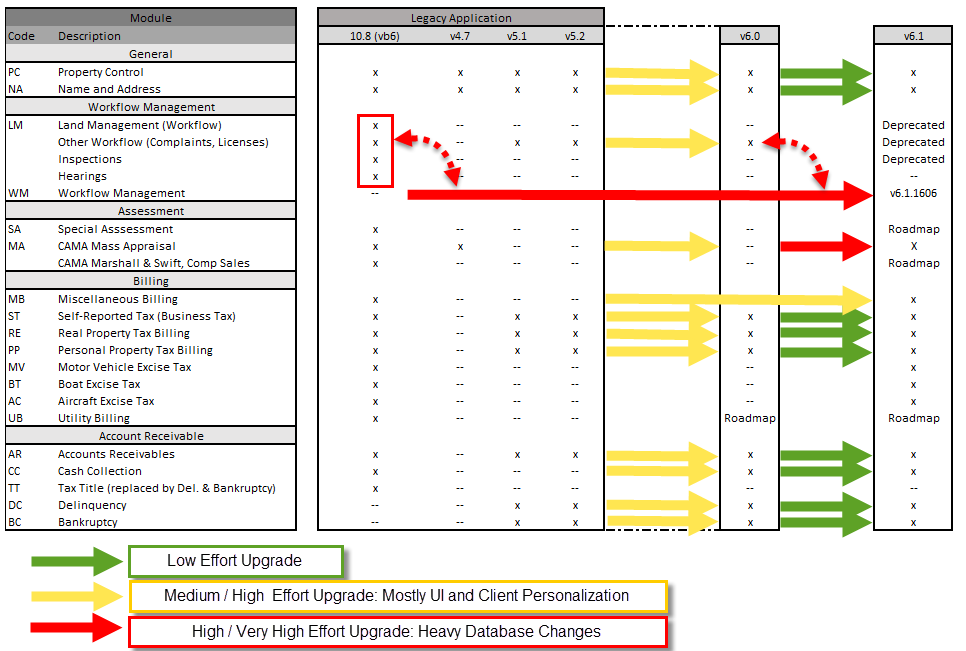
100-upgrade-ux-table.png

If you are upgrading Govern OpenForms 4.7.4, 5.1 or 5.2 to OpenForms 6.0

If you are upgrading to 6.1

General Upgrade Path

100-upgrade-ux-table.png

See Also


100-upgrade


0 votes, average: 0.00 out of 50 votes, average: 0.00 out of 50 votes, average: 0.00 out of 50 votes, average: 0.00 out of 50 votes, average: 0.00 out of 5 (0 votes, average: 0.00 out of 5)
You need to be a registered member to rate this.
Loading...

What’s New in v1606

What’s New in Release 1606

OpenForms Technology

General

  • [6.0] Database Extraction Tool Functionality for Personal Property
  • [6.0] System Batch process that can be executed in GNA and Govern. Batch Process Definition will be created automatically by the Database Verification Utility.
    • MSGDatabaseStructure_SystemData.xml was added for Batch Process
  • [6.0] System Batch Process Audit Information
    • Default Parameter Audit Record entries for system collections were removed
    • Audit records labels can be added in a batch process : Can replace Step 1 and Step 2 information (needs to be specified when designing)

Technology and Architecture

  • [6.0] OpenForms Technology: New Margins Property
  • [6.1] OpenForms View Query: Ability to click on a link and load a different Govern ID. (developed to support Corporate Account)
  • [6.1] Create new reserve names parameter for standard organization Address and Logo
  • [6.1] History Toolbox
    • Ability to change the year regardless if there are records for the years
    • Tool Box displays information for name base profiles
  • [6.0] System Dictionary updated during the Verify Database for missing Business Entity Attributes.


Standard OpenForms Controllers

Read More...

  • [6.0] CO Generic Link Controller (Link to Names, Link to Parcels, etc.) without delete capabilities. The standard controller was changed to remove delete capabilities of the linked item for system integrity and a new controller was added with the Delete Capabilities. This was necessary since it some context, you do not want users to delete an existing link. Although security was applicable to the delete feature, it was changed to support system integrity business rules.
  • [6.0] Standard Create A/R Controller


Systems and Application Modules

Property Control / Name and Address

[6.0] Centralized ACH Information

  • Name and Address (101-na-frm-001)
  • ACH Information (101-na-frm-016)
  • Mailing Index (101-na-frm-002)

[6.0] Name Linking (101-na-frm-035)

  • New Link Type for ST Corporate Account


Miscellaneous Billing

The module is now available on OpenForms, GA Release 6.1.1606

  • [6.1] Mailing Index is now used for Misc. Billing Accounts to support the centralized ACH processing.
    • Created automatically (included in Control) – Miscellaneous Correction Script will create in the Verify Database Process.
  • [6.1] Account Maintenance
  • [6.1] Invoice Maintenance
  • [6.1] Recurring Invoice Maintenance
    • Command button to Open the list of available Invoices for the Account to create a new Recurring Invoice
  • [6.1] Batch Processing
    • Process Recurring Invoices
    • Post Miscellaneous Billing to A/R
    • Recompute Sales Tax
    • Copy to Year (Administrative Batch Process available to run in GNA and Govern)
    • Initialize Next Year Recurring Invoices (same)


  • [6.1] Administrative Functions (Parameters)
    • Account and Invoice Structure (SY REGISTRY)
    • General Parameters
    • Categories
    • Items
    • Recurring Batch Codes
    • Copy to Next Year
    • Initialize Next Year
    • Templates for Land Management Automation (Land Management Road Map)
  • [6.1] Reports
    • New standard Invoice Report

Mass Appraisal

  • [6.1] MA Tables Auto Select code when we only have 1 value available
  • [6.1] New Action Button to call the MA Compute for current parcel
  • [6.1] MA Table Feature – Ability to use a mask
  • [6.1] MRA OpenForm Reference modified to include the Overrides
  • [6.1] MA Compute: Add a parcel Range User Criteria in the Compute Batch Process
  • [6.1] MA Tables Select/Deselect All option to exclude value


Accounts Receivable and Cash Collection

  • [6.0] ACH Processing Implementation – Mailing Index start of implementation – to be continued in 1609
  • [6.0] Lock Box Processing


Self-Reported Tax & e-Gov

  • [6.0] New Corporate Account
  • [6.0] Filings Transfer Enhancement
  • [6.0] Create and manage digital (electronic) signatures
    • Add in setup in GNA to activate feature in eRemittance
    • eRemittance Preview WebControl to ask for password of eProfile
    • Account Selection modified to show Accounts by Mailing Index and allow to inactive access
  • [6.0] ACH Debit feature (turned on in GNA)


System Options and Third Party

The following changes have been made to optional systems and third party integration.

Matix GIS Integration

  • [6.1] Change Base Map On the Fly: It is now possible to change the base map to display directly in the viewer. (validate if 6.0)
  • [6.1] MATIX – Print Capabilities – Consume Image
    • Multimedia button in menu bar
  • [6.1] Free Hand Selection Mode is now functional
  • [6.1] New Selection Mode (Circle, Ellipse, Triangle)

e-Government

  • [6.0] Ability to capture and store bank information (including routing and account numbers) when checks are processed via lockbox and e-Checks. (validate if standard)


Payment Processor Forte

  • [6.0] New payment processor Forte introduced for Govern OpenForms 6.0.1606. Forte for eGoverment processes coming in 1609.


100-wnew-v1606


0 votes, average: 0.00 out of 50 votes, average: 0.00 out of 50 votes, average: 0.00 out of 50 votes, average: 0.00 out of 50 votes, average: 0.00 out of 5 (0 votes, average: 0.00 out of 5)
You need to be a registered member to rate this.
Loading...

Product Resources page

Product Resources

System

100-Expressions
100-Queries
100-Constants
100-Formulas & Logical Expression
100-SY Registry

Database Diagrams

Visio Database Diagrams

Data Configuration

Resource File
System Validation Tables
User Tables

Technical Information

System Dictionary (SY DICT DESC)
Data Mapping

TECH NOTE: The main difference between a QUERY and an EXPRESSION is that the expression has access to the FORM’S Attributes. Furthermore, these expressions are bound to the entity. Change EVENTS will recalculate any expression that depends on, or uses a, newly changed attribute.

– # –


Govern Technical Standards

Govern Technical Standards

Overview

Govern has established standards and best practices at both the database and application level.
Unless specified otherwise, customized tables, attributes, etc. should be prefixed by the customer 3 digit code.

What’s New

[6.1] Database Table Names are limited to 30 characters to support Oracle Database Business Rules.

[6.0.1409] All Govern Database indexes that are managed by the application now have the prefix of GV_.
You can now delete indexes (Govern or ALL) in GNA, when you run a Database Verification.
IMPORTANT: Govern indexes are automatically recreated. Custom indexes are not.

[6.1] New Table Name Business Rule

  • must start with a LETTER
  • must not contain special characters except the underscore ‘_’
  • must be less than 8 characters

Database Objects Standards

These standards are mandatory as the naming convention is used in the application and can cause problems in certain situations if not followed or if reserved words or prefixes are used.

Table Name

IMPORTANT: The table name maximum length is 30.
The name is broken down in 3 sections: Prefix + Type (optional) + Descriptive Name

  • Prefix:
    • SY System Config
    • USR User Config
    • OF OpenForms Config
    • MODULE (see Module Codes)
    • CUSTOMER CODE (if custom tables)
  • Type (optional):
    • parm (parameter)
    • lk (link to)
    • table (master table used often used for calculation)
    • tmp (temporary)
    • web (e-government)

Attribute Name (Fields)

    • CUSTOMER CODE prefix if customized fields (best practice)

Indexes & Primary Keys

  • Prefix:
    • PK = Primary Keys
    • GV = Govern Indexes – They are managed by the Verify Database and may be deleted.
    • Customer Code prefix is custom = We recommend to use a standard code for all custom indexes.

Views

  • Prefix:
    • V = Govern Standard Views
    • V_VT= User tables represented in a seperate view to be backward compatible with 6.0 reports, etc. Manage in GNA, Editors, User Validate Tables.,
    • VW = Customized Views
  • Prefix_TREEVIEW_ used for the different Treeview
  • Prefix_MATIX used for MATIX integration and setup by form


Stored Procedures

  • Prefix (to be verified):
    • As a general rule of thumb, custom stored procedures or packages should be prefixed with the customer code.


System Resources Standards

System Flags

Validation tables used by Govern are flagged as system and will be replaced when upgrading.

Connection Keys

Database name + Server + Server & Server Version

Batch Programs

  • Prefix with Customer Code for customized batch programs
  • Batch Codification and Classification for new programs

Reports

  • Prefix with Customer Code for customized batch programs

Govern Queries

  • AT= Audit / Summary
  • CN = Central Notes
  • DH = Dashboards
  • SM = Summary
  • PRF = Profile Queries

Module Codes

  • PC = Property Control
  • NA = Name & Address (na)
  • TX = Tax Real Property
  • PP = Personal Property
  • BT = Boat
  • AC = Aircraft
  • MV = Motor Vehicles Excise
  • BU = Business Tax
    • ST = Self Reported Tax
    • PM = Licenses
  • MA = Mass Appraisal
  • PM = Land Management (Before 6.1)
  • UB = Utility Billing
  • MB = Miscellaneous Billing
  • AR = Accounts Receivable
  • CC = Cash Collection
  • DC = Delinquency
  • TT = Tax Title
  • BR = Bankruptcy
  • WM = Workflow Management (6.1+)


100-Standards


0 votes, average: 0.00 out of 50 votes, average: 0.00 out of 50 votes, average: 0.00 out of 50 votes, average: 0.00 out of 50 votes, average: 0.00 out of 5 (0 votes, average: 0.00 out of 5)
You need to be a registered member to rate this.
Loading...

WM – System & User Registry

Workflow Management – System & User Registry

Version 6.1

System Registry Parameters

Registry Filter: None
Year Filter: Not Applicable

Section Name Key Name Key Value Description
Workflow Management Inspection Form Select a Form The inspection form is called automatically from different areas of the system.
When this is the case, the form selected here will be displayed.
Workflow Management Template Form Select a Form Workflow models are created dynamically.
In addition, if a form template is entered here, a workflow form for the model will be created.


User Registry Parameters

Registry Filter: Workflow Management
Registry Key Type: User ID

Section Name Key Name Key Value Description
Workflow Management Autocollapse Completed Steps True/False When checked, the steps completed will auto collapse in order to facilitate scrolling and viewing large workflows.
Workflow Management Completed Activity Color Color Picker Used to select for the user the color to display completed activities
Workflow Management Initiated Activity Color Color Picker Used to select for the user the color to display activities that are initialized


All Module System Registry

For a complete list of System Registry Parameters
Click here


100-sy-registry-wm


0 votes, average: 0.00 out of 50 votes, average: 0.00 out of 50 votes, average: 0.00 out of 50 votes, average: 0.00 out of 50 votes, average: 0.00 out of 5 (0 votes, average: 0.00 out of 5)
You need to be a registered member to rate this.
Loading...

Govern 10.8 to OpenForms 6.0 Upgrade

Upgrade from Govern 10.8 to OpenForms 6.0

Upgrading to OpenForms version 6.0 or greater

Overview

As Govern has undergone a major revamp it is a good time for business re-engineering. Prior to upgrading to 6.1, a review of customer processes and requirements is recommended.
More than likely needs have changed, not to mention technology, hardware and software that evolved.

  • NOT A REGULAR UPDATE *** Structure changes and new features that can bring significant benefits to users if reviewed and analysed beforehand.

See also Database Standards (100-Standards) | System Requirements (100-SysReq)

Configuration Changes

DATABASE Cleanup

To improve management, the reference database information is now recorded in a XML file and created automatically when GNA is first run. Indexes have been standardized (see standards).

  • Database column types, lengths and/or nullable properties, etc. when not in compliance with the ReferenceXML need to be cleaned-up.
  • Database Indexes should be deleted and recreated at each version upgrade. Please note that CUSTOM indexes will need to be recreated manually after a delete ALL!

NOTES:

  • Before starting the process, we highly recommend to review the CUSTOMIZED indexes to make sure they are still needed and that they do not create performance issues.
  • To make it possible to change field types in design mode when there is data in the column, you need to turn OFF the PREVENT DESIGN CHANGE option in MS SQL SERVER and make sure to turn it back ON afterwards!!!

CLEAN UP TIPS:

  • Delete the indexes first (ALL if you have reviewed custom indexes and can recreate them) than rerun the verify database. Invalid indexes can cause multiple errors.
  • Unused tables (ex: Boat, Aircraft, MV…) or empty tables (no records) should be deleted (quicker) as they will be created correctly at the next initialize.
  • Before making changes to the column types via the design mode, you need to turn off the option that ‘Prevents design changes in MSSQL SERVER‘. Remember to turn in back ON afterwards.

DOCUMENTATION

  • Detailed information on creating the windows environment, the upgrade process and examples of data corrections made to to an upgraded database.

700-upgrade108_to_60.pdf.
[700-upgrade108_to_60 documentation]

GOVERN STRUCTURE

The basic structure of Govern has changed. The profile is now the cornerstone of the setup and the security is setup directly in the OpenForms Designer.
The same table is used for USERS and Groups can be imported into ROLES in GNA. Note: Create the desired Structure on paper first to see if doing so will be effective.

FORMS
All forms need to be created using the new OpenForms DESIGNER.

PROFILES

Profile links need to be created for Batch Programs, Reports, Forms, Accounts Receivable, etc.

REPORTS
Report defined in the database (configured) are verified to make sure the SSRS or Crystal report exists in the standard or the custom folders defined.
Note: The user will be asked to delete invalid definitions the first time. Make sure report folders are setup correctly.

Step by Step

Update 10.8 to v6.0+ and create a deployment …

  1. Restore Database to MS SQL Server
  2. Create Deployment/Connection Key
  3. Download & Install Binaries
  4. Install GNA
  5. GNA Utilities – Verify Database
  6. Correct Errors — see MS SQL SERVER Option to allow
  7. GNA Utilities – Verify Database
  8. Review Users
  9. Review Departments
  10. GNA Import/Export – Import ….
  11. GNA Import/Export – Import Forms
  12. GNA Verify database (Always after an import)
  13. GNA System Registry for Reports
  14. GNA Create Profile (Forms, Reports, Batch Process (testbatch) ….
  15. GSM Synchronize
  16. GSM Import Departments (If desired)
  17. GSM Review Roles
  18. GSM Review Security (Applications, Forms, etc.)
  19. Open Govern and review the options
  20. Search, send to the treeview and open a form


Model Updater

IMPORTANT NOTE:
Model Updater has not been re-engineered for version 6.0. It is on the roadmap.

Troubleshooting

At any point, if there are problems, Govern VALIDATOR should be executed,


100-upgrade-GFWtoOF


0 votes, average: 0.00 out of 50 votes, average: 0.00 out of 50 votes, average: 0.00 out of 50 votes, average: 0.00 out of 50 votes, average: 0.00 out of 5 (0 votes, average: 0.00 out of 5)
You need to be a registered member to rate this.
Loading...