
Workflow Management Dynamic Searches
Version 6.1 (In Development)
Overview
Workflow Dynamic Search
A Dynamic Search has been created for the Govern Workflow module that will allow users to perform searches for all workflows that have been created in the system. Users will be able to search based upon criteria that apply to a Workflow, e.g. Application/Permit/Certificate number, Status, and so on. As with standard Govern searches, results are displayed in a grid that allows users to select all results, or a combination of results. Search results can then be copied to the Dataset Treeview for further use.
Functionality
When the Search is invoked, the form will determine the dataset type specified for the profile, i.e. the Profile ID. This profile ID will determine the type of Search that will be available to the user. As with standard Govern query searches, the results displayed in the grid are dependent upon the requested search criteria. For example a profile configured for a P_ID dataset will display the options for a Workflow Parcel search. Alternatively a NA_ID based profile will display options for a Workflow Name search.
Workflow Quick Search Option
- The Quick Search is designed to allow you to perform searches without switching from a currently open property record.
User Interface
Workflow Name Search parameters
Include Void Permits – When this option is selected, permits that have a status of VOID are also included in the search results.
Reference Number – Enter an applicable reference number for the required Workflow record(s).
Reference Type – If known, select a reference type of Application, Certificate, or Permit.
Last / First / Company Name / Initials – As with Govern name searches, enter a Last, First, Company, or Initial for the required Workflow record.
Status – If required select one of the following:
- Closed
- Completed
- On Hold
- Open
- Received
- Transferred to Other Department
- Void
Category – Select from the list of available categories. (Table: WM_PARM_CATEGORY.CATEGORY_CODE)
Type / Kind – Choose one of the options that you have access to from the list displayed. (Table: WM_PARM_KIND.KIND_CODE) or (Table: WM_PARM_TYPE.KIND_CODE)
Expiration Date (From / To) – Specify a date range that will be used to narrow your search.
| NOTE: The Expiration Date (From / To) are fields that REQUIRED for the Search to function. A From and To default date value of 01/01/1900 and 12/31/2099 are entered respectively. If no specific range is required or known, ensure that From and To values are present in their parameters. |
By Workflow (Parcel)
Reference Number – Enter an applicable reference number for the required Workflow record(s).
Reference Type – If known, select a reference type of Application, Certificate, or Permit.
Tax Map Number – In the field, enter an exact or partial tax map number.
Status – If required select one of the following:
- Closed
- Completed
- On Hold
- Open
- Received
- Transferred to Other Department
- Void
Category – Select from the list of available categories. (Table: WM_PARM_CATEGORY.CATEGORY_CODE)
Type / Kind – Choose one of the options that you have access to from the list displayed. (Table: WM_PARM_KIND.KIND_CODE) or (Table: WM_PARM_TYPE.KIND_CODE).
Expiration Date (From / To) – Specify a date range that will be used to narrow your search.
| NOTE: The dates are set to a default From and To value of 01/01//1900, and 12/31/2099, respectively. |
Result Grid
The result grid that is located in the lower part of the search pane is populated with the results of the search query.
Sorting Result Grid columns
The results displayed in the grid, can be sorted by column. The sort can be in ascending or descending order. In addition the results in the Result grid can also be filtered based upon the search result.
To sort, display, or clear filters, hover your pointer over the end of the column heading.
| NOTE: When a new search is performed, all set filters are automatically cleared. |
Result Grid columns – Name search
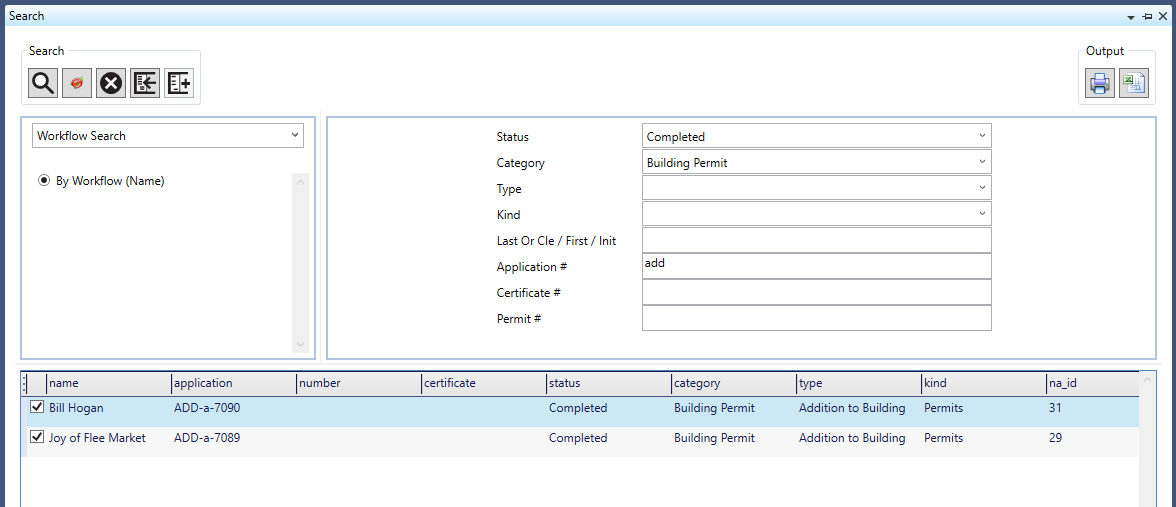
NA_ID – Name ID for the record. (Table: NA_NAMES.NA_ID)
Name – The record name from (Table: NA_NAMES.FREE_LINE_1).
Reference # – This column will contain the following:
- (Table: WM_MASTER.APPLICATION) for an Application.
- (Table: WM_MASTER.CERTIFICATE) for a Certificate.
- (Table: WM_MASTER.NUMBER) for a Permit.
Date – The expiration date is taken from:
- (Table: WM_MASTER.APPLICATION_DATE) for an Application.
- (Table: WM_MASTER.CERTIFICATE_DATE) for a Certificate.
- (Table: WM_MASTER.NUMBER_DATE) for a Permit.
Status – This the record status. (Table: WM_MASTER.STATUS)
Category – The category column is populated from (Table: WM_MASTER.CATEGORY_CODE)
Type – This column will display the record type that is specified in (Table: WM_PARM_TYPE.TYPE_CODE)
Kind – Displays the kind specified in (Table: WM_PARM_KIND.KIND_CODE)
Expiration_Date – The expiration date is taken from (Table: WM_MASTER.EXPIRATION_DATE)
WM_ID – This is the record workflow ID taken from (Table: WM_MASTER.WM_ID)
Result Grid columns – Parcel search
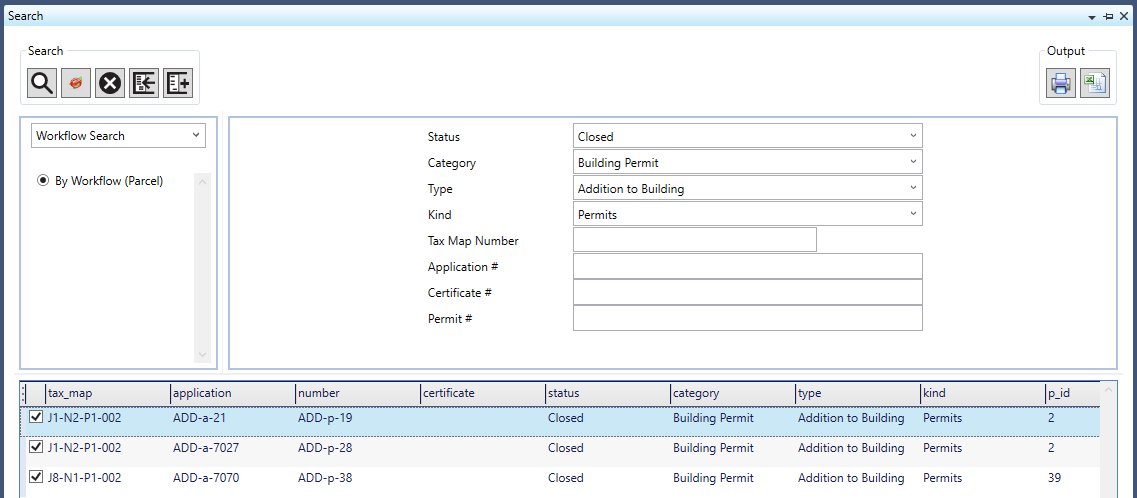
P_ID – This is the result parcel ID taken from (Table: PC_PARCEL.P_ID)
Tax_Map – The tax map is the result found in (Table: PC_PARCEL.TAX_MAP)
Reference # – This column will contain the following:
- (Table: WM_MASTER.APPLICATION) for an Application.
- (Table: WM_MASTER.CERTIFICATE) for a Certificate.
- (Table: WM_MASTER.NUMBER) for a Permit.
Date – The expiration date is taken from:
- (Table: WM_MASTER.APPLICATION_DATE) for an Application.
- (Table: WM_MASTER.CERTIFICATE_DATE) for a Certificate.
- (Table: WM_MASTER.NUMBER_DATE) for a Permit.
Status – This the record status. (Table: WM_MASTER.STATUS)
Category – The category column is populated from (Table: WM_MASTER.CATEGORY_CODE)
Type – This column will display the record type that is specified in (Table: WM_PARM_TYPE.TYPE_CODE)
Kind – Displays the kind specified in (Table: WM_PARM_KIND.KIND_CODE)
Expiration_Date – The expiration date is taken from (Table: WM_MASTER.EXPIRATION_DATE)
WM_ID – This is the record workflow ID taken from (Table: WM_MASTER.WM_ID)
Documentation
Click below to view or download the documentation for this feature.
101-wm-fea-004 Workflow Management Dynamic Searches.pdf
Related Topics
OpenForms Reference (OFR) – System Queries
OpenForms Reference (OFR) – System Dynamic Searches
101-wm-fea-004
 (0 votes, average: 0.00 out of 5)
You need to be a registered member to rate this.
 Loading...