AR Deposit Number Setup and Management

Accounts Receivable (A/R) – Deposit Number Setup and Management

Overview

This section provides an overview of the A/R administrative forms. For the complete reference guide, see 101-all-001-GovernAccountsReceivable-(man)-(6.0). For the A/R Transaction Rules, see 101-ar-001-AR-TransRulesGL.

Activate Deposit Management

The Deposit Management feature automatically creates a unique batch number for each payment entered through the Payment Data Entry form.

  • Select this option to activate automatic manual deposit management numbering.

The Deposit Management feature automatically creates a unique batch number for each payment entered through the Payment Data Entry form.
When Deposit Management is enabled, the Deposit Numbers appear in drop-down list on the A/R Inquiry form.functions.

Separate Deposit for Credit Card Payments

  • Select this option to enable the separate deposit account for credit card payment option.

Automatically Assign Deposit Number

  • Select this option to use automatically assigned deposit numbers.
  • The auto-assign deposit number is made up of the current date, the initials of the currently logged-in user, and a sequence number, as follows: YYYYMMDDNNNS.
    • Four digits are used for the year, two for the month, two for the day, three for the initials of the currently user, one for a sequence number.
    • For a user with initials JCC, on Sept. 17, 2013, the automatically assigned deposit number is 20130917JCC1.
NOTE: When less than three initials are entered, an underscore character “_” replaces each missing initial, i.e. 1 or 2 letter initials. Following the previous example, this is 20130917JC_1
The initials entered in the Initials field on the User Maintenance form in Govern Admin are used in the Auto-Assign Deposit Number option in Govern Admin is selected.

Default Deposit Number

There are several options for setting up a Default Deposit Number for payments entered through the Payment Data Entry function.
The options for creating the default deposit number include:

Using the Effective Date and User ID

Use any combination of date and User ID field. There are three date formats.

  • The Deposit Number is composed of the User ID and Date.
  • The Date is the Effective Date of the Payment Data Entry record.

For this type of deposit number:

  • Select User ID from the left or right drop-down list.
  • Add a Date field. The date can be formatted as year, month, day; day, month, year or month day year depending on your preference.

Using the Last Deposit Number
To create a Default Deposit Number using the last deposit number entered:

  • Select Last Deposit, from the drop-down list. Note: This disables the drop-down list on the right.
  • The last deposit number entered by the logged-in user is automatically entered on the Payment Data Entry user form and on the Cash Collection Parameters form

Prevent Override of the Deposit Number

  • Select this option to disable the deposit number entry screen when you launch the Payment Data Entry function, in Govern.
  • When this option is selected, the Payment Data Entry function opens directly using the default Deposit Number and the field is disabled.


103-ar-parm-Deposit


0 votes, average: 0.00 out of 50 votes, average: 0.00 out of 50 votes, average: 0.00 out of 50 votes, average: 0.00 out of 50 votes, average: 0.00 out of 5 (0 votes, average: 0.00 out of 5)
You need to be a registered member to rate this.
Loading...

103-ar-table-cctype

A/R & CC System Table CCTYPE

VT_SYSTEM TABLE = CCTYPE


  CODE SHORT_DESC_EN LONG_DESC_EN INVISIBLE LONG_DESC_FR
Standard CASH Cash Cash Argent Comptant
CHECK Check Check Chèque
MO Money Order Money Order Mandat postal
CERT_CHECK Certified Check Certified Check Chèque certifié
CC_DC Credit or Debit Credit or Debit Card Crédit ou Débit
New CHANGE Change Change TRUE Monaie
egov WEB_ACH Web ACH Web ACH TRUE Web – carte de débit
WEB_CC Web Credit Card Web Credit Card TRUE Web – carte de crédit
WEB_DB Web Debit Card Web Debit Card TRUE Carte de débit Web
WEB_ECHECK Web eCheck Web eCheck TRUE eCheck Web
WEB_HPG Web HPG Web HPG TRUE HPG Web
WEB_ICART Web iCart Web iCart TRUE iCart Web
other VISA Visa Visa TRUE Visa
MC Master Card Master Card TRUE Master Card
AMEX American Express American Express TRUE American Express
DISC Discover Card Discover Card TRUE Discover Card
PILOT Pilot Pilot TRUE Pilot
EFT EFT EFT TRUE EFT
OTHER-1 Other 1 Other 1 TRUE Autre 1
OTHER-2 Other 2 Other 2 TRUE Autre 2
OTHER-3 Other 3 Other 3 TRUE Autre 3
OTHER-4 Other 4 Other 4 TRUE Autre 4
OTHER-5 Other 5 Other 5 TRUE Autre 5


Troubleshooting Note: In Govern for Windows older versions, the CCTYPE System Validation table existed and was used for a different functionality. Contact R&D for more information.


103-ar-table-cctype


0 votes, average: 0.00 out of 50 votes, average: 0.00 out of 50 votes, average: 0.00 out of 50 votes, average: 0.00 out of 50 votes, average: 0.00 out of 5 (0 votes, average: 0.00 out of 5)
You need to be a registered member to rate this.
Loading...

103-bt-parm-CopytoYear

Copy Parameters to Year
Overview

Note: Functionality available in version 6.0.1505

Overview

The main purpose of this option is to copy all Year base parameter to another year. It will validate if the destination year exist, and if so, the user will have a warning message to override the data before executing the copy.

Furthermore, the copy will be refused if an Original Audit record is found in the AUDIT information (Entry_code = ‘original’)

AR – Transaction Types

Accounts Receivable (A/R) – Transaction Types

Overview

The following table provides a description and abbreviation for each A/ R transaction type. The transaction types are saved to VT_SY_ ARTRTYPE in the Govern database. They are used to populate the Transaction Type fields, on the A/R Class Parameters form on the A/R Transaction forms.

Click here for the pdf version.

The Transaction Type Codes are recorded in the AR Detail records.


Code Transaction Type Description
ab Abatement/Exemption A reduction of a payment or release from a payment.
adj Adjustment A modification made on an account or bill.
ajb Adjusted Bill A modification made to a Partial Billing record.
chg Charge An amount applied on an account or bill.
dct Discount A reduction on the total value or gross amount.
dep Deposit An amount of money placed in a bank.
dmd Demand A special charge applied to delinquent bills. This is used in the Motor Vehicle Excise Tax subsystem
dup Duplicate Payment A second payment made to cover an amount already paid.
fee Fee An amount charged for a service or product.
int Interest A charge, usually a percentage, applied on delinquent bills or borrowed money.
inv Billed (Invoice) A list of itemized amounts for goods and services.
mcr Misc. Cash Receipt An amount charged for an item not covered by other categories.
och Open Cash Credit A credit generated from a cash payment.
ocr Open Credit A credit generated from an adjustment.
ovr Overpayment

An adjustment generated from an overpayment on an installment. This is used in the Real Estate Tax module only.

Note: The Over, Short & Duplicate Method option must be selected on the Accounts Receivable General Parameters form in Govern Admin.

pdt Postdated Payment A payment dated later than the current date.
pen Penalty A charge applied on delinquent accounts.
pmt Payment Money given in exchange for goods or services.
rev Payment Reversal A correction made when an payment error has been entered and posted or a Not Sufficient Funds (NSF) check has been processed.
rf Refund An amount of money returned when an overpayment has been made.
sht Over & Short An amount generated from the Automatic Generation of Over & Short batch process.
td Tax Deferral A postponed tax payment.
tri Transferred To Tax (I/P) Interest and penalty charges transferred from the Special Assessment subsystem
tt Tax Title Lien A charge applied on property for the fulfillment of a debt or duty.
tti Tax Title Lien Interest The interest generated from the tax title.
tto Transferred Principal The amount of principal transferred to tax.
ttp Transferred (Interest and Penalty) The amount of interest and penalty transferred to tax.
ttx Transferred To Tax The total amount transferred, including principal and interest.
tx1 Sales Tax 1 A Sales Tax calculation method in which the first and second taxes are added together; then, applied to the bill.
tx2 Sales Tax 2 A Sales Tax calculation method in which the first tax is added to the bill; then, the second tax is calculated on this amount.
vp Voluntary (Advanced) Payment

An amount that is paid before the bill is received; for example, a taxpayer may forward a payment to cover bills during a predicted absence.

Note: If you select Voluntary Payment, as the transaction type, on a Govern user form, an AR_ID is required for the NA_ID or P_ID associated with the record.


NOTE: The Deposit, Postdated Payment, Payment, and Voluntary Payment transaction types are not distributed to Govern’s G/L


101-ar-ref-TransactionType


0 votes, average: 0.00 out of 50 votes, average: 0.00 out of 50 votes, average: 0.00 out of 50 votes, average: 0.00 out of 50 votes, average: 0.00 out of 5 (0 votes, average: 0.00 out of 5)
You need to be a registered member to rate this.
Loading...

Standard AR Controller – Create AR Payment Action Button (101-ar-fea-024)

Standard AR Controller – Create A/R Payment Action Button

Overview

NOTE: The following specifications will change due to enhancements, and as such may change.

This standard controller can be setup on different Account Forms (Real Property, Misc. Billing, Self-Reported Tax…) in order to provide the user with an Action Button to create an A/R payment for the users to enter payments, deposits or voluntary payments against this Account.

  • The Create A/R Payment button can be used for all Sub-Systems (Real Property, Self-Reported Tax, Personal Property, Miscellaneous Billing, etc.)
  • The AR Record to pay is determined by the action button controller setup….
  • This action button can be secured by profile user and role.

Functionality

This controller is used in different standard Forms distributed with the system. It can also be added and configured on a customized form.

NEW! The action button will open a Cash Collection Form in a modal window. When the form is opened, the focus will be on the Cash Collection tab. Next, a new Data Payment Entry record is created. The Subsystem and Transaction Type will be set to the ones specified in the action button properties. Note that these fields will be disabled in the Cash Collection form. If there are any ID’s, or a payer name is specified, they will be auto-loaded and set. When the payment is saved, the AR Detail links will be added if needed. At the end of the process, if required, the Cash Collection is closed.

Configuration

To add or configure this controller on a a form see below:


Read More...


Govern New Administration (GNA)

To configure in GNA…

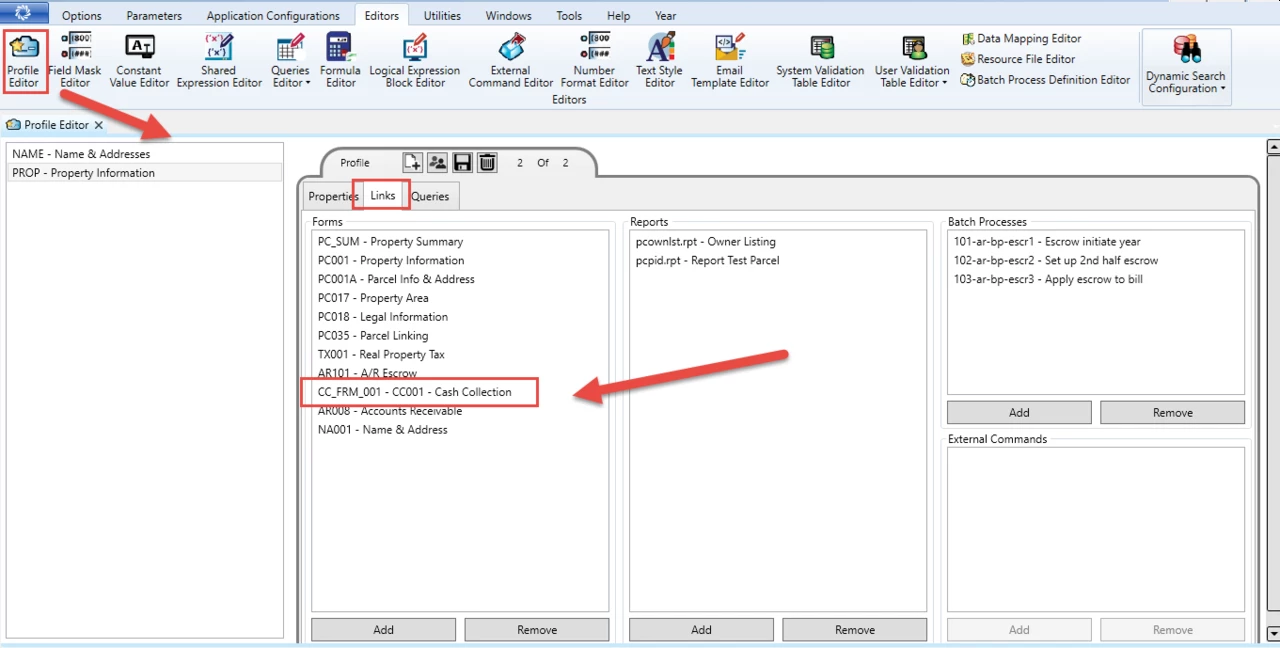
  1. On the GNA ribbon select Editors (tab) > Editors (group) > Profile Editor.
  2. In the Profile Editor, ensure that you have linked the cash collection form that will be opened by the AR Create Payment action button.

OpenForms Designer (OFD)

In the OFD, follow these steps…

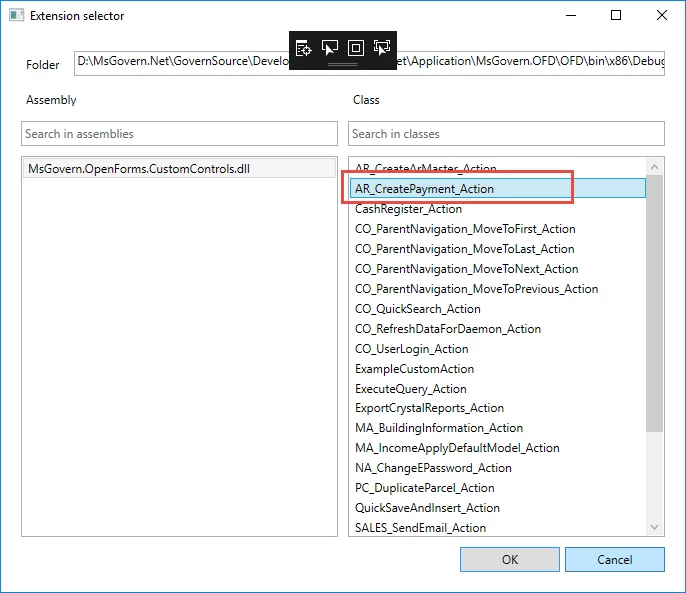
  1. Select the action for action button, i.e., the Ar_CreatePayment_Action.

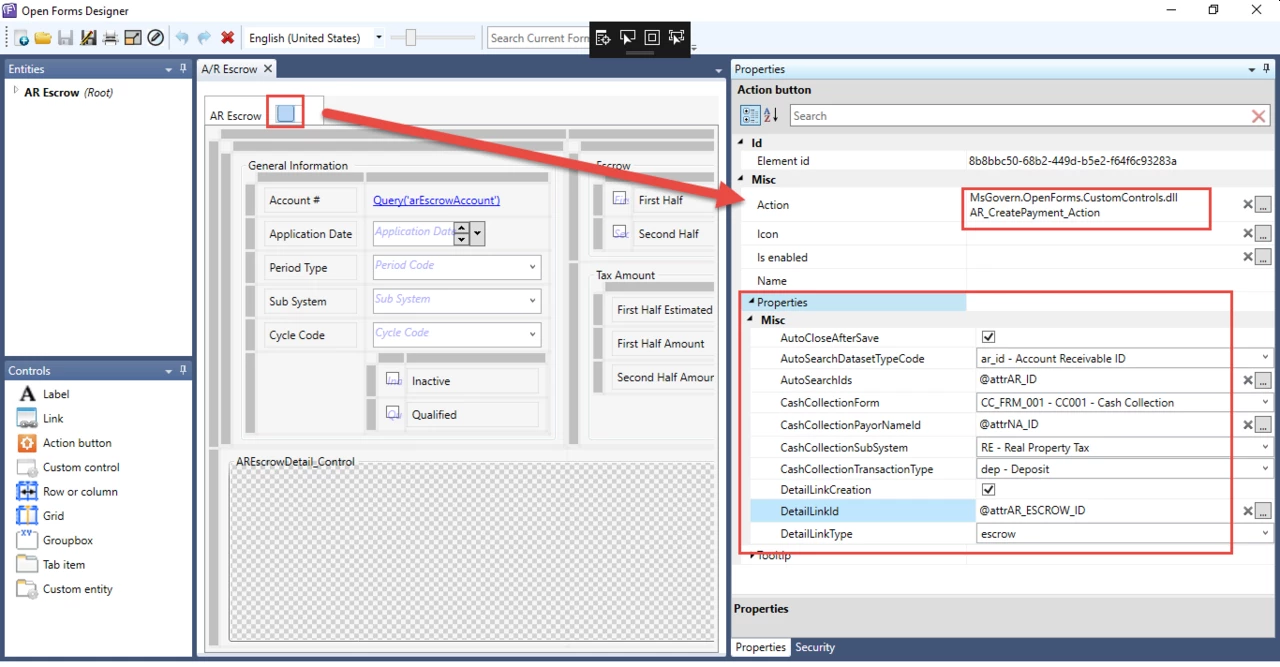
The following are the available properties with their associated descriptions.

  1. AutoCloseAfterSave : When checked, the modal window in which the cash collection form was opened will be closed after the completion of the payment.
  2. AutoSearchDatasetTypeCode : Chose the Dataset Type code that defines the ids that you want to auto load (e.g ar_id, p_id)
    • If this is not set the Auto load will not function properly
  3. AutoSearchIds : An expression that returns a list of ids seperated by “;” that you want to load in the cash collection form automatically
    • E.g of a the output of a the expression = “10;30;100” or “20”
    • If this is not set the Auto load will not function properly
  4. CashCollectionForm : The form that you want to open for the payment.
    • This must be a form that is linked to the current profile
  5. CashCollectionPayorNameId : An expression that returns a na_id that you want to set as the default payor for the payment
  6. CashCollectionSubSystem : The subsystem for the payment transaction.
  7. CashCollectionTransactionType : The transaction type for the payment transaction (Note: The transaction field on the cash collection form will be disabled so you should use this property to set the correct transactiontype)
  8. DetailLinkCreation : If checked, a detail link will be created for all the Ar Details that are created for the payment transaction.
  9. DetailLinkId : An expression that returns the link id that will be inserted for the new ar details links (AR_DETAIL_LINK.LINK_ID)
    • If this is not set, no detail link will be created even if the DetailLinkCreation property was set to true.
  10. DetailLInkType : The type for the new detail links (AR_DETAIL_LINK.LINK_TYPE)
    • If this is not set, no detail link will be created even if the DetailLinkCreation property was set to true.


Contact your System Administrator or Business Analyst for more information on this feature implementation in OpenForms.


Related Topics


101-ar-fea-024


0 votes, average: 0.00 out of 50 votes, average: 0.00 out of 50 votes, average: 0.00 out of 50 votes, average: 0.00 out of 50 votes, average: 0.00 out of 5 (0 votes, average: 0.00 out of 5)
You need to be a registered member to rate this.
Loading...

AR – Inquiry ACH Information

Accounts Receivable (AR) Inquiry ACH Information

Overview

The A/R Information tab of the A/R Inquiry form includes a section for ACH Information.

This is updated automatically when you run the Prepare Data for ACH and the ACH Generate File batch process. For details, see
ACH Batch Processes


101-ar-frm-004


0 votes, average: 0.00 out of 50 votes, average: 0.00 out of 50 votes, average: 0.00 out of 50 votes, average: 0.00 out of 50 votes, average: 0.00 out of 5 (0 votes, average: 0.00 out of 5)
You need to be a registered member to rate this.
Loading...

101-ar-brules-techspec

Cash Collection Technical Specification

Version 6.0 – Version 6.1 (under construction – software not released)

Technical Specification

The following is intended for administrators, super users and business analysts.


What’s new

Batch ID version Batch Number


101-ar-brules-techspec


0 votes, average: 0.00 out of 50 votes, average: 0.00 out of 50 votes, average: 0.00 out of 50 votes, average: 0.00 out of 50 votes, average: 0.00 out of 5 (0 votes, average: 0.00 out of 5)
You need to be a registered member to rate this.
Loading...