
Standard Accounts Receivable (A/R) Controller – Create A/R Payment (Configuration)
Overview
This standard OpenForms Action Button controller can be added to a form to provide an Action Button to create the Accounts Receivable payment.
This controller is available in GA Release 1706
- For more information on the functionality, see Product Information (101-ar-fea-024).
Prerequisites
The following conditions are required in order to enable the Controller in OpenForms Designer Setup
- The organization is licensed for the Accounts Receivable Sub-System to setup
- The configuration for the Accounts Receivable has been completed
- The Form’s ID Setters Properties must contain the …
- The Govern ID must be …
Profile Security
- The user must have security access (GSM) to the profile’s form.
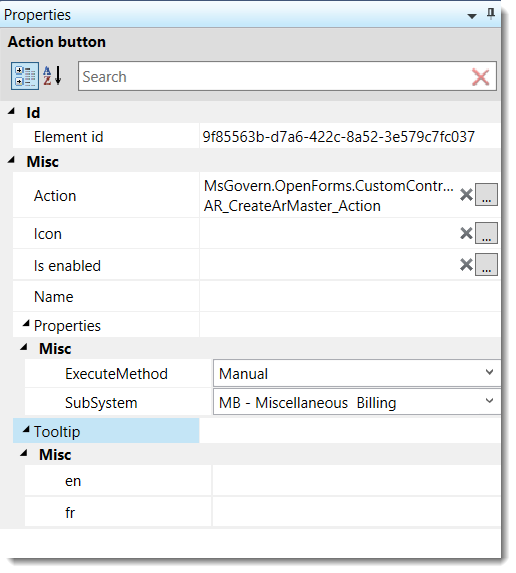 |
| Action Button Controller Properties |
Controller Setup
Adding a Custom Control to a Form
- In OFD, drag the Action Button Control Icon to the Account Entity Tab on the form.
Custom Control Form Configuration
Once the Custom Control is displayed on the form, click on the object to configure the:
- Assembly Name = Msgovern.OpenForms.CustomControls.dll (by default)
- Class Name = AR_CreateARMaster_Action
User Interface (UI)
- Icon
- Is enable: An expression can be added to control the enabling (Can be executed) of the button.
Controller Properties
The following controller properties need to be set:
Sub-System
- Select the sub-system for which the A/R Summary Record needs to be created.
Related Topics
For more information, see:
- Govern OFD MANUAL 105-ofd-all-GovernOpenFormsDesigner-(user)-(man)-(6.1) see Chapter 3 – Links
- Product Information
Troubleshooting
- The Organization must be a licensed user of the A/R Sub-System selected.
101-ar-fea-024-ofr
 (0 votes, average: 0.00 out of 5)
You need to be a registered member to rate this.
 Loading...
 Business Entity Designer (BED)